Build a GitHub Profile README That Feels Like Home Base
// November 30, 2025
I just refreshed my GitHub profile README so it mirrors the tone of tomosman.com. This post walks through why that surface matters and how to create one without treating it like yet another documentation chore.
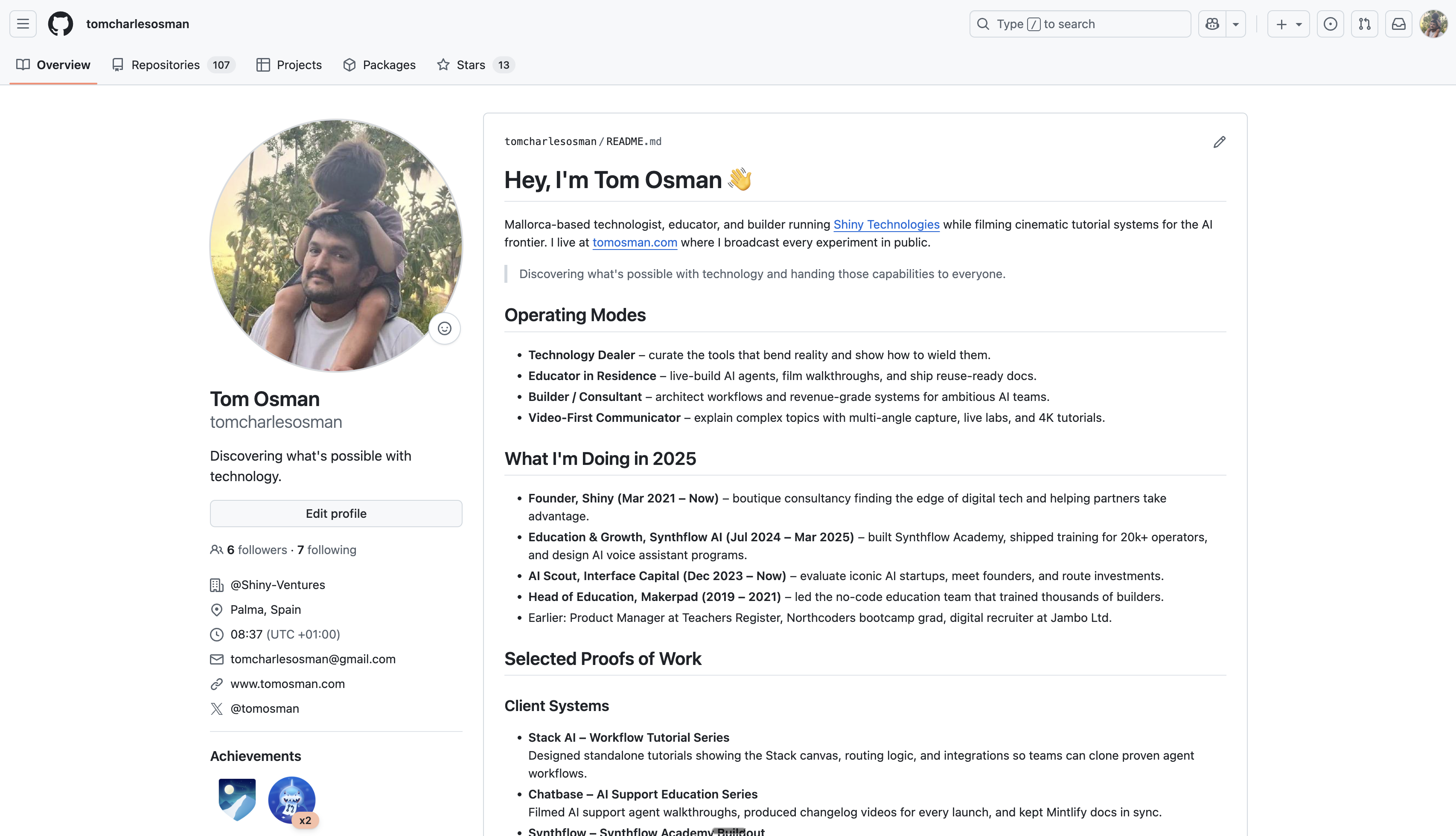
What is a Profile README?
If you create a public repository named exactly after your GitHub username and drop a README.md inside, GitHub renders that Markdown at the top of your profile. The file sits above your pinned repos and is the first thing anyone sees when a tweet, talk, or doc links to your profile.
Reference docs: Managing your profile README
Why Bother?
- Instant positioning. Most profiles show pins + activity with no context. A README lets you clarify what you do before people infer it.
- Asymmetric proof. Investors, hiring managers, and collaborators hit your profile to sense-check credibility. Shipping a concise narrative with links to proofs gives them everything in one view.
- Distribution leverage. Anytime you comment on an issue, open a PR, or join a discussion, people click your avatar. A thoughtful README converts those fly-bys into subscribers, briefings, or customers.
- Sync with your site. Treat it like a condensed version of your home page—same hero statement, current work, tools, and contact protocol.
Prep Your Story
Before you write Markdown, gather:
- Hero line – the one-sentence promise you want associated with your work.
- Operating modes – 3-4 roles or focus areas that frame how you deliver value.
- Proofs – recent projects, clients, or playbooks you can point to.
- Stack – the tools you rely on (especially if you teach or advise on them).
- Contact links – email, site, newsletter, and socials.
- Availability – how/when to work with you, including constraints (e.g., retainers, location).
Collecting all of this up front lets you treat the README as an edit job instead of a blank-page problem.
Ship It in Five Steps
- Create the repo.
tomcharlesosman/tomcharlesosmanin my case. Initialize with aREADME.mdin the root. - Draft sections locally. I mirrored the structure of my site: operating modes, current roles, proofs of work, stack, philosophy, and collaboration CTA.
- Use Markdown for scannability. Mix headings, lists, and block quotes. Keep paragraphs tight so it looks great on desktop and mobile.
- Add links everywhere. Link to case studies, live demos, MDX posts, and booking flows. Make it impossible for a motivated visitor to not take the next step.
- Review for tone + accuracy. Read it out loud. If it doesn’t sound like you in a meeting, rewrite it. Double-check dates, job titles, and tool names.
Layer Personality + Proof
Here’s how I mapped the surface area of my site into the README:
- Hero / manifesto – pulled straight from the home page hero and manifesto block.
- Timeline highlights – summarized the
/timelineentries into “What I’m doing in 2025.” - Portfolio snippets – turned
/portfoliocase studies into concise bullets for Stack AI, Chatbase, Synthflow, Yes Coach, and LUMIER. - Tools inventory – highlighted the handful of tools I personally rely on and teach often.
- Work with me – ported the AI Tutorial Lab positioning so visitors know the exact offer and availability.
The key is to anchor every section in something you’ve already published. No need to reinvent the narrative—just compress it.
Keep It Alive
- Schedule refreshes. I review it every time I ship a new launch post or change retainers (roughly monthly).
- Log the delta. Track edits in your site repo so you can evolve the README alongside other brand collateral.
- Measure interest. Add a unique
mailtosubject, Calendly route, or UTM’d link so you can see how much inbound comes from GitHub.
Your GitHub profile is often the most trusted surface you own outside of your personal site. Invest twenty focused minutes to turn it into a landing page that matches your flagship home base, and you’ll convert casual repo surfers into collaborators way faster.
If you want help architecting the full stack—site, README, launch plan, and cinematic product education—send a brief to tom@tomosman.com.